
On this page
About a month ago we asked you what you think about the new Filen mobile app. A lot of you replied, some with quick ratings, some with very detailed comments.
Thank you for that.
This post sums up what you told us and what we are doing with it.
You will see the charts for the multiple choice questions in the post but we won't analyze every detailed commend. Here we focus on the main patterns, what they say about our current mobile app, and what we will be changing.
DISCLAIMER:
In this review, we are primarily focusing on the negative aspects of the feedback we received. The majority of it was positive, as you can see from the numbers, and we received thousands of really kind comments from users who had only good things to say.
However, in this post we don’t want to praise ourselves, but rather address constructive criticism. Because of that, the post may come across a bit more negative than the overall feedback actually was.
Who Took Part In The Survey
How long people have been using Filen
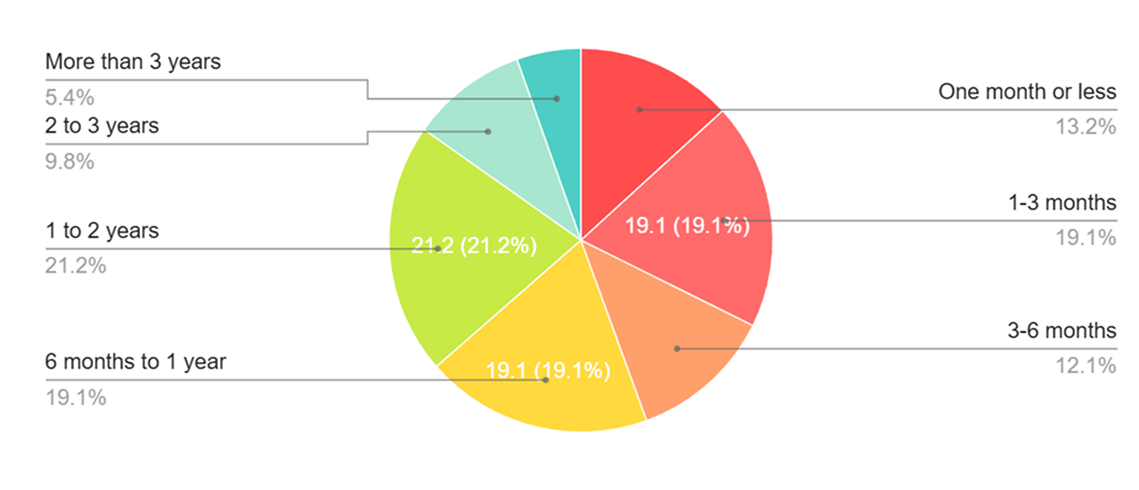
In the first chart you can see how long people have been using Filen in general.
Roughly speaking:
- Around 10 to 15 percent have started using Filen in the last month.
- Around one third have been using Filen for up to 6 months.
- Around 40 percent are in the range from 6 months to 2 years.
- Around 15 percent have been with us for more than 2 years.
So the answers are not only from long time power users. A noticeable share are new or newer users who still have a fresh view on the product. That is good for us, because it means Filen is still growing and the new app is reaching new people.
Which platform are you using the new Filen Mobile App on?
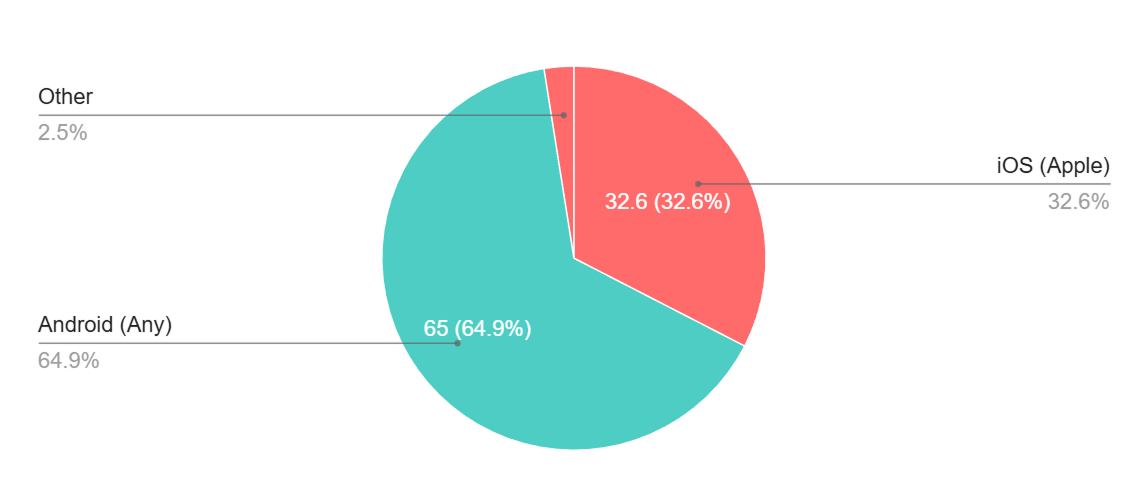
In the platform chart the split is clear:
- About one third of you use Filen on iOS.
- About two thirds use Filen on Android.
So the feedback is a bit more Android heavy, but there is a solid amount of iOS feedback as well. When we talk about issues or improvements below, we always keep both platforms in mind. By the way, our internal statistics show that the split between Android and iOS is actually more like 50/50. So this metric really just indicates which group participated more in this survey.
Devices people mentioned
In the free text answers, many of you named your devices when describing bugs or crashes. There is a wide range of hardware:
- Multiple iPhone generations and some iPads.
- Many Samsung Galaxy models.
- Pixel phones, OnePlus, Sony, Redmi and others.
So we are not only looking at one specific phone model. The app is being used on mid range devices and on flagships. Most of the time when we discover errors, they’re related to specific models or versions of operating systems.
Overall Experience With The New App
In the overall rating on a scale from 1 to 10 most of you are in the upper range. A lot of ratings sit around 7 and 8. There are also a good number of very high ratings. At the same time there is a smaller group that gives the app a clearly lower score.
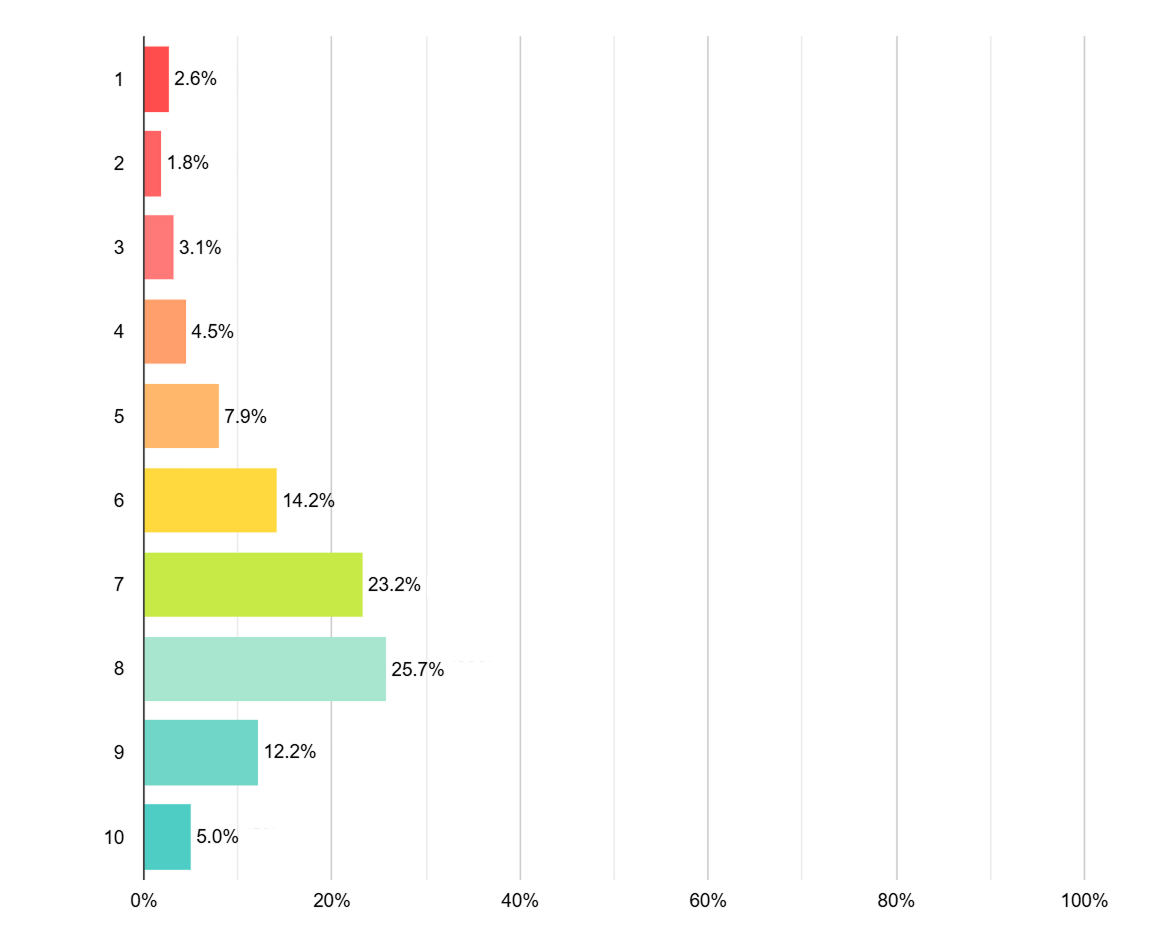
This matches the written feedback quite well. Many people see the new app as a clear step forward in design and structure, but it still has rough edges that keep it from feeling completely finished. Our median score is 7/10.
That is more or less what we expected from such a big rebuild. The point of this survey was to figure out which parts we should work on first.
How Different Parts Of The App Scored
Performance, design, uploads and search
In the chart for Question 5 you rated several areas from "Very poor" to "Excellent".
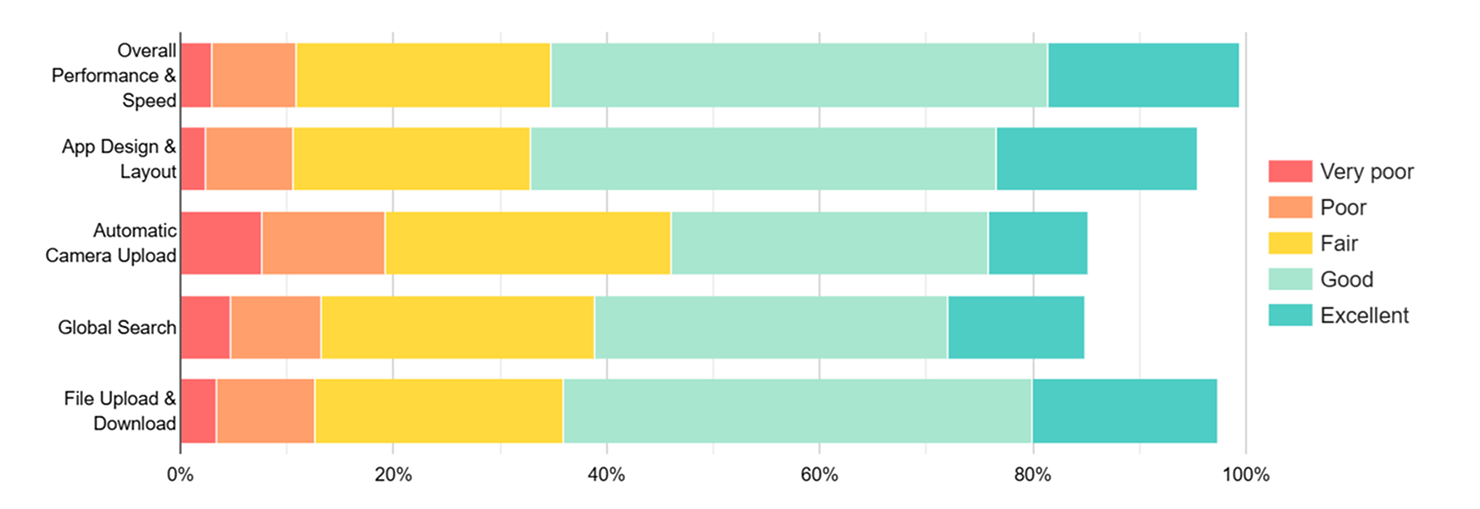
The pattern looks like this:
- Overall performance and speed: Mostly "Good" and "Excellent", but there is a visible group that feels it is too slow in some places.
- App design and layout: The new design is mostly rated as "Good". Many comments say that it looks cleaner and more modern than the old app.
- File upload and download: Also mostly "Good", but if uploads hang or feel unreliable, people are understandably annoyed.
- Global search: Here the ratings move down. A lot of answers are only "Fair" or "Poor". We understand the rating at this point, especially considering that many users didn’t realize that global search initially only works for newly uploaded data. The technology we use to enable global search despite encryption requires indexing all data. Currently, only newly uploaded data is being indexed, and we’re planning a re-indexing of all data once the feature has been released for all our products.
- Automatic camera upload: This is one of the weakest rated areas. Many people are not happy with how it behaves right now. However, we’ve also noticed that problems with automatic camera uploads occur especially on older Android devices. We’re still analyzing which factors play a role there.
Integration, battery, media and stability
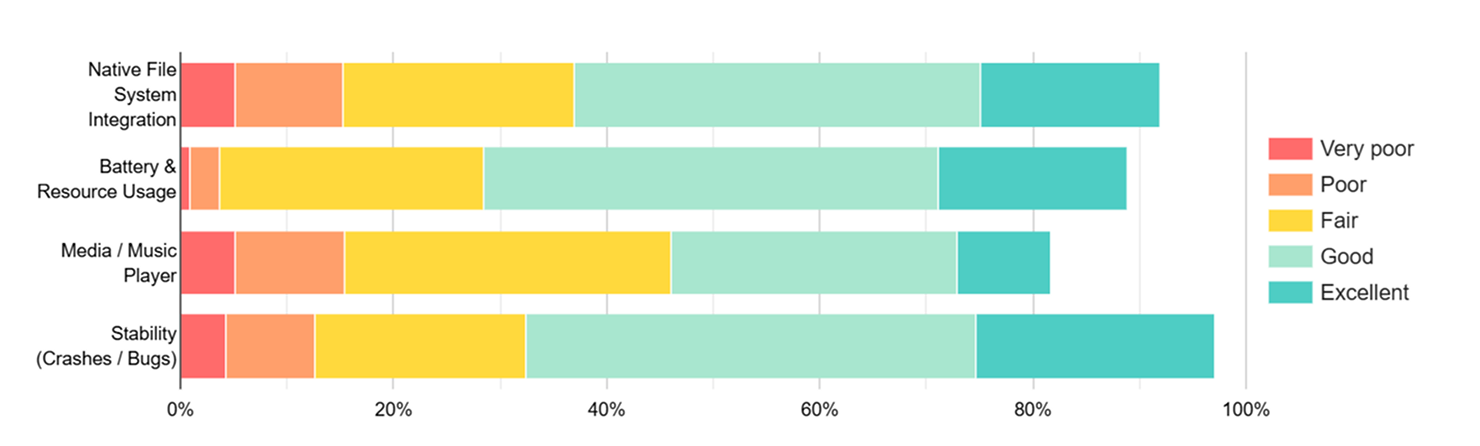
In Question 6 you rated some more aspects:
- Native file system integration sits in the middle. Many "Good" answers, but also quite a few "Fair" and "Poor".
- Battery and resource usage is mostly "Fair" to "Good", with some reports of battery drain in certain situations. We are looking into it.
- Media and music player is one of the lower rated parts of the app. We noticed that significantly more iOS users complained here compared to all the other questions. Since iOS tends to make things difficult for third-party apps when it comes to using resources or native features/information, we’ll take a closer look at what might be causing the problem there.
- Stability gets a decent rating overall, but not high enough to say "no problem here". Crashes and hangs are still a issue for some of you.
Later in the survey, about one quarter to one third of you say you saw bugs or crashes, while around two thirds did not. That is not unusual for a fresh rebuild, but it is higher than we want. We will eliminate this problem in the future by always sending larger releases to the public beta before we roll them out. Even our fairly large group of closed beta testers can’t cover all edge case scenarios and device types. In the future, every major release will go through the following phases:
Development -> Internal testing -> Closed beta testing -> Open beta testing -> Release
Performance And Photos
A lot of written comments point to cases where the app feels slower than it should. Common examples are:
- Large folders that take some time to scroll.
- Many thumbnails loading at once.
- The Photos tab feeling heavy or slow.
What we have done so far:
- We profiled the app to find slow parts, especially on Android.
- We optimised components that were doing too much work.
- We focused specifically on the Photos tab, because it was mentioned very often.
Some of these changes are already in current builds, others roll out with upcoming updates. If the app felt "laggy" before, it should slowly become smoother, especially when you browse photo heavy folders.
This kind of tuning is never really finished. We will continue to watch real world performance and look at heavy workflows like scrolling, media and long lists.
Also please keep in mind that all thumbnails and all images you view are downloaded to your device (without you noticing) due to our client-side encryption and are stored in a cache. How well thumbnail generation and scrolling work depends heavily on your internet connection and your device’s performance. Of course, we’re doing everything we can on our side to get the most performance out of it. Nevertheless, a new iPhone Pro model in Germany will always provide a better experience than an old Xiaomi with Android 12 in the Himalayas.
Automatic Camera Upload
Automatic camera upload clearly needs some work. It didn’t perform as poorly as some social media posts might suggest, but it is still one of the lowest-rated areas, with around 7% of users rating the feature as very poor and about 11% rating it as poor. The comments say roughly the same things again and again:
- Uploads move forward only when the app is open.
- Upload queues get stuck or seem frozen.
- People are not fully sure that every photo is actually backed up.
- The expectation is that camera upload just works in the background without babysitting it.
We have put this topic very high on our priority list.
We are working on:
- Identifying the devices and operating systems that cause the most issues
- More reliable background uploads.
- Better handling of timeouts and bad connections.
- Fewer situations where uploads silently stall.
- Clearer feedback in the app when something is wrong.
This touches several parts of the app at once, so the changes will not all arrive in a single update. But the survey made it very clear that this is one of the features we need to improve.
Global Search
Global search ends up in a kind of "ok, but not great" zone. The core feature works, but (as mentioned above) it is not yet fully ready for use, since so far only newly uploaded data will be indexed. We expect that the rating will improve significantly once all products receive this feature and it works with all data in the account.
You can clearly see that this plays a major role from the comments as well, since many of the issues mentioned are due to the fact that, as planned, not all data is currently appearing in global search yet:
- Some files are hard to find or do not show up as expected.
- The behaviour sometimes feels inconsistent.
- Quite a few people would like more powerful features like filters or even full content search inside files.
But since search is more than just a bonus feature in a cloud storage service, and many of you rely on it to move through large collections of folders and files, we have marked search also as an area for future improvement. That means:
- Making the current behaviour more predictable.
- Then, step by step, turning it into a more powerful tool with better results and more options.
We will not promise specific dates here, but it is clear that search has to become better than "just fine".
Media, Photos And Player
The media and music player ratings are also not as good as most of the other parts. A lot of bugs and crashes are tied to photos and videos.
Typical problems in the answers:
- Some image and video formats behave strangely.
- Videos can stutter or not feel very smooth.
- The audio player is very basic and some people would like at least a bit more comfort.
Some crashes also happen when opening photos, switching full screen or rotating the device.
What we already fixed or improved:
- The Photos tab now loads thumbnails more efficiently.
- Transitions into and out of video full screen are more robust, especially when biometric prompts or the lock screen are involved.
- We fixed several crashes and freezes that happened in media or offline related flows.
Next steps:
- Continue to stabilise the media viewer.
- Improve support for formats that have caused trouble.
- Consider moderate upgrades to the media experience without turning Filen into a full media player app.
For many of you Filen is an important place for photos and videos, not just a generic file bucket, so this area will keep getting attention.
File System Integration And Offline Use
The ratings for native file system integration and offline use are mixed but lean towards "Good".
From the free text answers:
- Some people are very happy that Filen shows up in the system file picker and document provider.
- Others run into issues when using Filen content from third party apps.
- Some are confused about cache behaviour or see freezes when removing items from the offline list.
We have already:
- Fixed a problem where removing a file from the offline list could freeze the app in some cases.
- Fixed crashes when opening certain advanced settings on Android.
- Smoothed some parts of the navigation in settings.
- Added an option to configure the file provider cache size so you have more control over how much is cached locally when using the system file manager.
We will:
- Investigate adding support for other apps to use Filen-stored folders as regular filesystem folders, which will require additional engineering work on our side that we hadn’t anticipated (this will also work with tools like Cryptomator).
- Make navigation from the home screen to settings more consistent.
The goal is that Filen feels like a natural part of your device, while still doing all the encryption and privacy work in the background.
Stability, Locks And Biometrics
Around one quarter to one third of you report that you have hit bugs or crashes. Around two thirds+ say they did not.
Many of the bugs you mention are connected to:
- Specific screens and flows.
- Lock screen and biometric lock interactions.
- PIN prompts that show up at strange times.
Here is what we already changed:
- A bug where the "lock immediately" setting could trigger the PIN screen too often when opening other activities on top of the app is fixed.
- The behaviour of the biometric lock timeout when dealing with uploads, media and other external actions is improved.
- Crashes when entering some advanced settings screens on Android are fixed.
- We are improving how the video viewer exits full screen when a biometric prompt appears, so that it does not feel broken or stuck.
The aim is that the app feels secure without getting in your way all the time.
Notes, Lists And Small Quality Of Life Fixes
Not all feedback is about big systems. Some of it is about small but very visible things.
Examples from the survey:
- Worries about losing note changes when switching away from the app.
- Strange behaviour in checklists when pressing Enter.
- Selection states that do not reset correctly after navigation.
Based on this we:
- Added logic to save notes more reliably when the app is suspended.
- Fixed the checklist behaviour so Enter does what you expect.
- Fixed selection handling in multi select dialogs like selectDriveItems so they reset correctly when you navigate away.
These changes are not huge on their own, but they reduce friction in everyday use.
Power Users And Security: Master Key Export
A part of our user base uses Filen with multiple clients, CLI tools or password managers. Some of you asked for a way to back up your master key in a controlled way.
In response we added an "Export master key" option to the app.
This lets you export your master key and store it safely, for example in a password manager or in an offline backup, with clear warnings so you understand what you are doing.
What People Feel Is Missing
One of the later questions asked whether there is anything you expected in the new app but could not find.

Looking at the chart:
- The majority answered "No". For them the app covers the essentials they need at the moment.
- The sizeable rest answered "Yes" and described what they miss.
The most common wishes are:
- More advanced offline and sync controls.
(This is especially difficult to implement on iPhone, since iOS allows hardly any background activity for third-party apps. We’re doing what we can in that regard.) - A richer photo experience, for example timeline views or better organisation options.
(That will come in the future, but for now the focus is on improving what’s already there and on API 4.0.) - A more capable media player for people who listen to audio directly from Filen.
- Better in app explanations and help for new users.
We cannot build everything at once, but this part of the survey is very helpful for prioritising. Some of the items you listed are already done or in progress. Others are now clearly marked as interesting areas for future work.
Sidenote: A fairly large number of survey participants actually talked about things from our other products in their responses. We thought it was very clear what the survey was about, but we hope this didn’t distort the results too much.
What Happens Next
To wrap it up:
- The new Filen mobile app is a big step forward and many of you like where it is going. The new app’s overall rating currently has a median of 7 out of 10 points.
- At the same time the survey makes it very clear where we still need to improve:
- Automatic camera upload.
- Search.
- Media and photo handling.
- Some parts of performance, integration and stability.
We have already shipped a large number of fixes and improvements based directly on your feedback. More are being worked on right now.
Because Filen is open source, you can follow many parts of our progress on GitHub, see what is changing behind the scenes and, if you like, contribute yourself.
Most of all: we will keep listening.
Thank you for taking the time to answer the survey, for testing the new app in real life and for helping us decide what to work on next.
-Team Filen